

Insights
Federated Deployment
Monitor NATS systems at several sites and see all of them in one web UI.
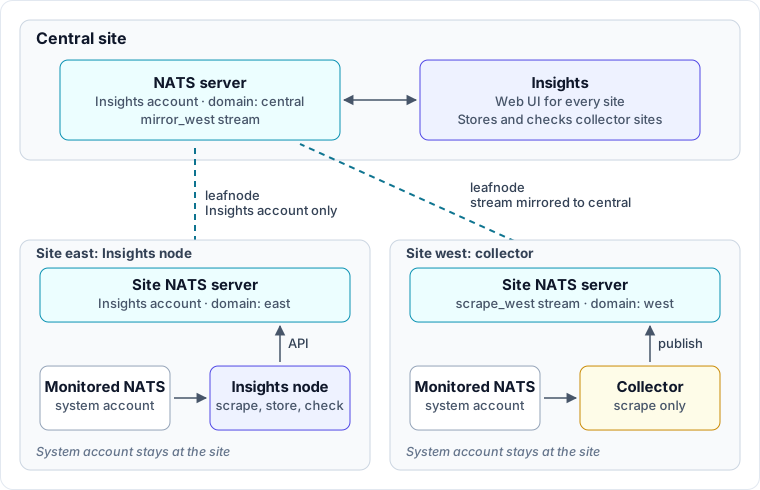
In a federated deployment, each site runs Insights next to its own NATS system, and a central site serves the web UI. Each site connects to the central site's NATS server over a leafnode that carries only the account Insights uses. The monitored system's system account never leaves its site, and the central site never connects to the monitored systems.
Choose What Runs at Each Site
Each site runs one of two things. The network setup is the same for both. What differs is where the data is stored and checked.
| Insights node (recommended) | Collector | |
|---|---|---|
| Runs at the site | insights, the full binary | insights-collector, a smaller binary that only scrapes |
| Database and checks | At the site | At the central site |
| Data kept at the site | History for db.retention.duration | A short buffer until the central site copies it |
| Runs at the central site | insights web, or any Insights node | An Insights node that stores and checks the site's data |
Run a full Insights node at a site unless you have a reason not to. Each site keeps its own data and runs its own checks, and nothing is copied between sites.
Run a collector when a site can't spare the memory and disk for a database, or when you don't want monitoring data kept at the site. The central site then copies the site's scrape stream and does the storage and checks there.
You can mix both in one deployment.
Connect the Sites
Every site needs the following, whichever option it runs:
- A NATS server at the site with JetStream enabled and its own JetStream domain.
- A NATS server at the central site with JetStream enabled and a different domain.
- A leafnode from the site to the central site that carries the account Insights uses. This guide calls that account
INSIGHTS. The site's system account is not bridged. - A unique
system.idfor each site's system. This guide useseastfor a site with an Insights node andwestfor a site with a collector. - Network access from each site to the central site on the leafnode port (
7422by convention). The central site never connects to a site.
The system id names everything Insights creates for that system: the $INS.sys.<id>.* API, the scrape_<id> stream, and its subjects, $INS.sys.<id>.scrape.>. Because every subject includes the id, sites can share the INSIGHTS account without their subjects colliding. This is not access control: any user in the account can query every site. If sites must not see each other's data, give each Insights user permissions scoped to its own system (see Insights Permissions). Separate accounts per site would also stop the central web UI from finding the sites, because it discovers and queries them within one account.
Site NATS Server
Give each site's JetStream domain the same name as its system id, so $JS.west.API clearly refers to site west. Bridge only the INSIGHTS account:
# site-west.conf
server_name: west-1
listen: 0.0.0.0:4222

jetstream {
  domain: west
  store_dir: /data/nats/jetstream
}

leafnodes {
  remotes = [
    {
      url: "nats-leaf://insights:insights-password@central.example.com:7422"
      account: INSIGHTS
    }
  ]
}

accounts {
  INSIGHTS: {
    jetstream: enabled
    users: [ { user: insights, password: insights-password } ]
  }
  SYS: {
    users: [ { user: sys, password: sys-password } ]
  }
}
system_account: SYS
Two accounts matter here. SYS is the system account Insights scrapes. INSIGHTS holds the scrape stream and the Insights API, and it is the only account that crosses the leafnode.
The examples on this page use passwords to stay short. In production, use your usual NATS authentication, such as JWT credentials, and point Insights at it with creds or context.
Central NATS Server
The central NATS server runs JetStream under its own domain, accepts leafnode connections, and defines the same INSIGHTS account. A leafnode joins the account of the user it logs in as, so sites that log in as insights join only that account.
# central.conf
server_name: central-1
listen: 0.0.0.0:4222

jetstream {
  domain: central
  store_dir: /data/nats/jetstream
}

leafnodes {
  port: 7422
}

accounts {
  INSIGHTS: {
    jetstream: enabled
    users: [ { user: insights, password: insights-password } ]
  }
}
Insights Permissions
If you restrict the users Insights connects with, this is a working baseline for a site node, a collector, or a central node:
permissions {
  publish {
    allow = [
      "$INS.>",     # scrape data, discovery, and the Insights API
      "$JS.API.>",  # stream management
      "$JS.FC.>",   # flow control replies
      "_INBOX.>"    # request replies
    ]
  }
  subscribe {
    allow = [
      "_INBOX.>",   # request replies
      "$INS.>",     # discovery and the Insights API
      "$SRV.>"      # NATS service discovery
    ]
  }
}
To limit a connection to one system, replace $INS.> with $INS.sys.<id>.>, $INS.node.<node_id>.>, and $INS.ping.
Option 1: Insights Node at Each Site
The site node is an ordinary single-system Insights node. It scrapes the site's system, stores the data, and runs checks. What makes it part of a federation is its connection to the site's INSIGHTS account, and turning off the embedded NATS server so its stream lives on the site NATS server:
# east.yaml, run with: insights -c east.yaml
node:
  id: east

system:
  id: east

data-dir: /var/lib/insights

# The INSIGHTS account on the site NATS server. The central site reaches this
# node's API through the leafnode.
nats:
  server: nats://site-east:4222
  user: insights
  password: insights-password

# The site's system account, which is what Insights monitors.
sys:
  server: nats://site-east:4222
  user: sys
  password: sys-password

sink:
  embed: false
The site node can also serve its own web UI. Leave web enabled if people at the site should use it directly.
At the central site, run a web UI connected to the central NATS server's INSIGHTS account. It needs no database and no license:
insights web \
  --server nats://central:4222 \
  --user insights --password insights-password \
  --web.hostname 0.0.0.0
The web UI finds every system that answers on the shared account and lists them on its Systems page. It looks for systems when it starts, so restart it after you add a site. A full Insights node on the central NATS server does the same, so if the central site also monitors its own system, that node's web UI can show every site.
Check that every site is reachable from the central site:
insights system list --server nats://central:4222 --user insights --password insights-password
insights db query --server nats://central:4222 --user insights --password insights-password \
  --system east "SELECT count(*) FROM hx.servers"
Option 2: Collector at a Site
A collector scrapes the site's system and publishes the data to a stream on the site NATS server. A central Insights node copies that stream to the central NATS server with a JetStream mirror, then stores the data and runs checks.
Collector Config
The collector monitors one system:
# collector.yaml, run with: insights-collector -c collector.yaml
node:
  # Must differ from the central node's node.id.
  id: west-collector

system:
  # Must match the system id configured on the central node.
  id: west

# The INSIGHTS account on the site NATS server, where the scrape stream lives.
nats:
  server: nats://site-west:4222
  user: insights
  password: insights-password

# The site's system account, which is what the collector scrapes.
sys:
  server: nats://site-west:4222
  user: sys
  password: sys-password

scraper:
  interval: 1m

sink:
  # How much data the stream keeps.
  retention: 6h
Run it with insights-collector -c collector.yaml. serve is the collector's default command, so insights-collector serve -c collector.yaml does the same thing.
The collector reads only the node, system, nats, sys, scraper, sink, license, updater, telemetry, and data-dir settings, plus log-level. It has no database, so it doesn't need a data directory. If no NATS server is configured, it stops at startup:
collector requires an external NATS sink: set --server (or --context, or --scraper.nats.server) to the local leafnode that stores the scrape stream and serves the $INS API
On startup, the collector creates the scrape_west stream on the site NATS server with the subject $INS.sys.west.scrape.>. If the stream already exists, the collector uses it without changing it. To replicate it, run a clustered site NATS server and set sink.replicas.
Central Node Config
On the central node, a collector site is a systems: entry with no scrape: block. With no scrape connection, the central node knows another process fills the stream, so it creates a mirror and only stores and checks the data:
# central.yaml, run with: insights -c central.yaml
node:
  id: central

data-dir: /var/lib/insights

# The INSIGHTS account on the central NATS server.
nats:
  server: nats://central:4222
  user: insights
  password: insights-password

# The mirror lives on the central NATS server, not in an embedded one.
sink:
  embed: false

db:
  memory-limit: 4GiB # per system

systems:
  - id: west
    retention: 6h
The id must match the collector's system.id, and the two nodes need different node.id values. A collector's node.id defaults to its system id, and a node that starts with an id already in use stops with node.id "west" is already in use on this NATS.
A systems: list can mix entries: one with a scrape: block that the central node scrapes directly, another without one that a collector fills. See Configuration for every per-system setting.
How the Mirror Is Created
The central node names its mirror mirror_west and asks the collector for its stream details over $INS.sys.west.ops.sink.info: the stream name, subjects, JetStream domain, and scrape interval. It builds the mirror from that answer, reaching the site's stream through the site's domain, $JS.west.API.
If the collector hasn't answered yet, the central node logs waiting for the scrape side and tries again every 15 seconds. It doesn't guess, because JetStream can't change a mirror after it is created. Each system waits separately, so one unreachable collector doesn't hold up the others.
If you reach the site's JetStream through a subject mapping or an account import instead of a domain, the collector can't know the prefix. Set it on the central node:
systems:
  - id: west
    mirror-api-prefix: JS.west.API
To set the mirror's name, replicas, or storage, add a stream: block. Any setting you leave out comes from the top-level sink: section:
systems:
  - id: west
    stream:
      name: mirror_west
      replicas: 3 # requires a clustered central NATS server
      storage: file
If a stream with that name already exists, the central node uses it without changing it. stream.name can't be the collector's stream name (scrape_west).
Retention
retention limits how much data the stream and the mirror keep. The central node's database keeps history for db.retention.duration (32 days by default). Insights removes whole epochs, oldest first, so the indexer never reads half an epoch. The streams Insights creates have no max_age.
The collector trims its stream. The central node trims the mirror, using the scrape interval the collector reports. After an outage, the central node doesn't trim the mirror until it has caught up with the site's stream, so the indexer doesn't lose epochs it hasn't read yet.
Check the Mirror
Look at the site's stream from the central site:
nats stream info scrape_west --js-domain west
Look at the mirror on the central NATS server. The mirror section shows the source and how far behind it is:
nats stream info mirror_west
A working mirror catches up to the site's stream and then keeps pace with it. Confirm that new epochs are stored:
insights db query --system west "SELECT max(epoch) FROM hx.servers"
insights node list shows both nodes: the collector serves west (scrape) and the central node serves west.
If the mirror stays empty or doesn't catch up, check:
- The domain. The domain in the site NATS server config must match the one the mirror uses, for example
westand notWest. - Permissions. The central site's
INSIGHTSaccount must be able to reach$JS.west.API.>across the leafnode and receive the replies. - The leafnode. Nothing is mirrored while the leafnode is down. Check
nats server report connectionsor the server logs on both sides.
Fix a Wrong Mirror
JetStream can't change a mirror's source after it is created, and a mirror pointed at the wrong place doesn't report an error. It just stays empty. On startup the central node compares an existing mirror with what the collector reports and logs any difference:
level=WARN msg="mirror does not match origin" system=west detail="origin name: mirror has \"scrape_edge\", origin reports \"scrape_west\""
To fix it, delete the mirror and restart the central node, which creates a new one:
nats stream rm mirror_west
The new mirror copies whatever the site's stream still holds, and the central node's database keeps the older epochs it already stored.
To create the mirror yourself instead, use a JSON stream config, because the --mirror flag can't point at another domain:
{
  "name": "mirror_west",
  "storage": "file",
  "retention": "limits",
  "discard": "old",
  "num_replicas": 1,
  "mirror": {
    "name": "scrape_west",
    "filter_subject": "$INS.sys.west.scrape.>",
    "external": {
      "api": "$JS.west.API"
    }
  }
}
nats stream add mirror_west --config mirror.json
Then set stream: { name: mirror_west } on the system entry. Keep these rules:
- Set
filter_subjectto$INS.sys.<id>.scrape.>. The central node reads the subjects from it, and without it logsmirror has no filter subjectand doesn't store the system. - Don't add
subject_transforms. The stored subjects must stay as the collector published them. - Give the mirror a different name from the site's stream.
Mirror Permissions
The central NATS server reads the site's stream on the mirror's behalf. With the INSIGHTS account bridged and JetStream enabled on both sides, as above, this works without extra configuration.
If you restrict the leafnode or split the sites into separate accounts, these subjects must pass in the right direction:
$JS.west.API.CONSUMER.CREATE.scrape_westand$JS.west.API.CONSUMER.CREATE.scrape_west.>, which create the mirror's consumer.$JS.FC.>, flow control replies.$JSC.R.>, consumer create replies.$JS.M.>, the mirrored messages and heartbeats.
If one is missing, the mirror exists but stops copying. See the NATS JetStream wire API reference.
If you narrow the central node's own $JS.API.> permissions, keep these:
$JS.API.STREAM.CREATE.mirror_west, unless you create the mirror yourself.$JS.API.STREAM.PURGE.mirror_west. Without it, the mirror is never trimmed and grows without limit, and the central node logsmirror prune failed.$JS.API.INFO, so the central node can read its own domain when it checks the mirror.