Playground
In this tutorial you run the gateway as a playground and send messages between MQTT, NATS and AMQP clients. Then you connect four small clients of your own. Everything runs on your machine, and you need no config file.
Before you start
You need:
- The
mq-gatewaybinary. See Install. The playground needs no license. - The MQTTX CLI.
- The
natsCLI. - Python 3 with
pip install paho-mqtt python-qpid-proton. - For step 6: Java 17 or later, Maven 3.9 or later, and Go 1.26 or later.
Ports 1883, 4222, 5672 and 8080 must be free.
1. Start the playground
./mq-gateway playground
The playground runs a NATS server with JetStream inside the gateway. It also creates streams and buckets for you. When the gateway is ready, it prints this:
mq-gateway playground: fixed credentials, on loopback. Not for production.

  account  DEMO
  user     mqg      password mqg    (the gateway's own)
  user     demo     password demo   (for clients, and any client that sends no credentials)

  NATS  nats://127.0.0.1:4222
        nats --server nats://127.0.0.1:4222 sub '>'
  MQTT  mqtt://127.0.0.1:1883
        mqttx pub -h 127.0.0.1 -p 1883 -t 'demo/hello' -m hi -q 1
  AMQP  amqp://127.0.0.1:5672
  Page  http://127.0.0.1:8080
        publish and subscribe over MQTT, AMQP and NATS

  QoS 1 and 2 on demo/#, and unsettled AMQP transfers to demo.>, are stored in stream DEMO. Retained messages, sessions and AMQP delivery counts are on.
  For the page's scenarios, orders are stored in ORDERS under orders.<region>, and plant1's temperatures and alarms in PLANT.
Keep it running. Use a new terminal for each of the next steps.
2. Send a message over MQTT
-
Subscribe with MQTT 3.1.1:
mqttx sub -h 127.0.0.1 -t 'test/hello' -V 3.1.1MQTTX prints
Subscribed to test/hello. -
In a new terminal, publish with MQTT 5, the MQTTX default:
mqttx pub -h 127.0.0.1 -t 'test/hello' -m 'hello world'The subscriber prints
hello world.
3. Add a NATS client
The gateway changes each / in a topic to a . to make the NATS subject.
The topic test/hello is the subject test.hello.
-
Subscribe with NATS:
nats -s nats://127.0.0.1:4222 sub 'test.hello' -
Publish from MQTT again:
mqttx pub -h 127.0.0.1 -t 'test/hello' -m 'from mqtt'The NATS subscriber prints the message and the headers that the gateway adds:
[#1] Received on "test.hello"Mqg-Mqtt-Client-Id: mqttx_039fecfeMqg-QoS: 0from mqtt -
Publish from NATS:
nats -s nats://127.0.0.1:4222 pub test.hello 'from nats'The MQTT subscriber from step 2 prints
from nats.
4. Add an AMQP client
An AMQP address is a NATS subject with no change.
-
Save this receiver as
receive.py:from proton.utils import BlockingConnectionconn = BlockingConnection("amqp://127.0.0.1:5672")receiver = conn.create_receiver("test.hello")while True:msg = receiver.receive(timeout=None)print(bytes(msg.body).decode()) -
Start it:
python3 receive.py -
Publish from MQTT and from NATS:
mqttx pub -h 127.0.0.1 -t 'test/hello' -m 'from mqtt'nats -s nats://127.0.0.1:4222 pub test.hello 'from nats'The receiver prints
from mqttandfrom nats. -
Stop each client with Ctrl-C.
These messages traveled over core NATS. NATS delivered them only to the clients that had a subscription at that time. NATS stored none of them.
5. Use the playground page
The page publishes and subscribes over MQTT, AMQP and NATS from your browser. It traces each message from the client to its subscribers.
- Open http://127.0.0.1:8080.
- Select Routed orders in the Scenario list. The page connects two publishers and four subscribers.
- Click Send on the web shop publisher. A row appears in the
trace. It shows the AMQP transfer, the NATS message on
orders.EU, the message in streamORDERS, and the four subscribers that got it. - Change the web shop's
amountto500, then click Send. The EU large orders subscriber shows filtered by the gateway, because its selector isamount > 1000. - Click Send on the till publisher. The two EU subscribers show
filtered by the NATS server, because the order goes to
orders.US.
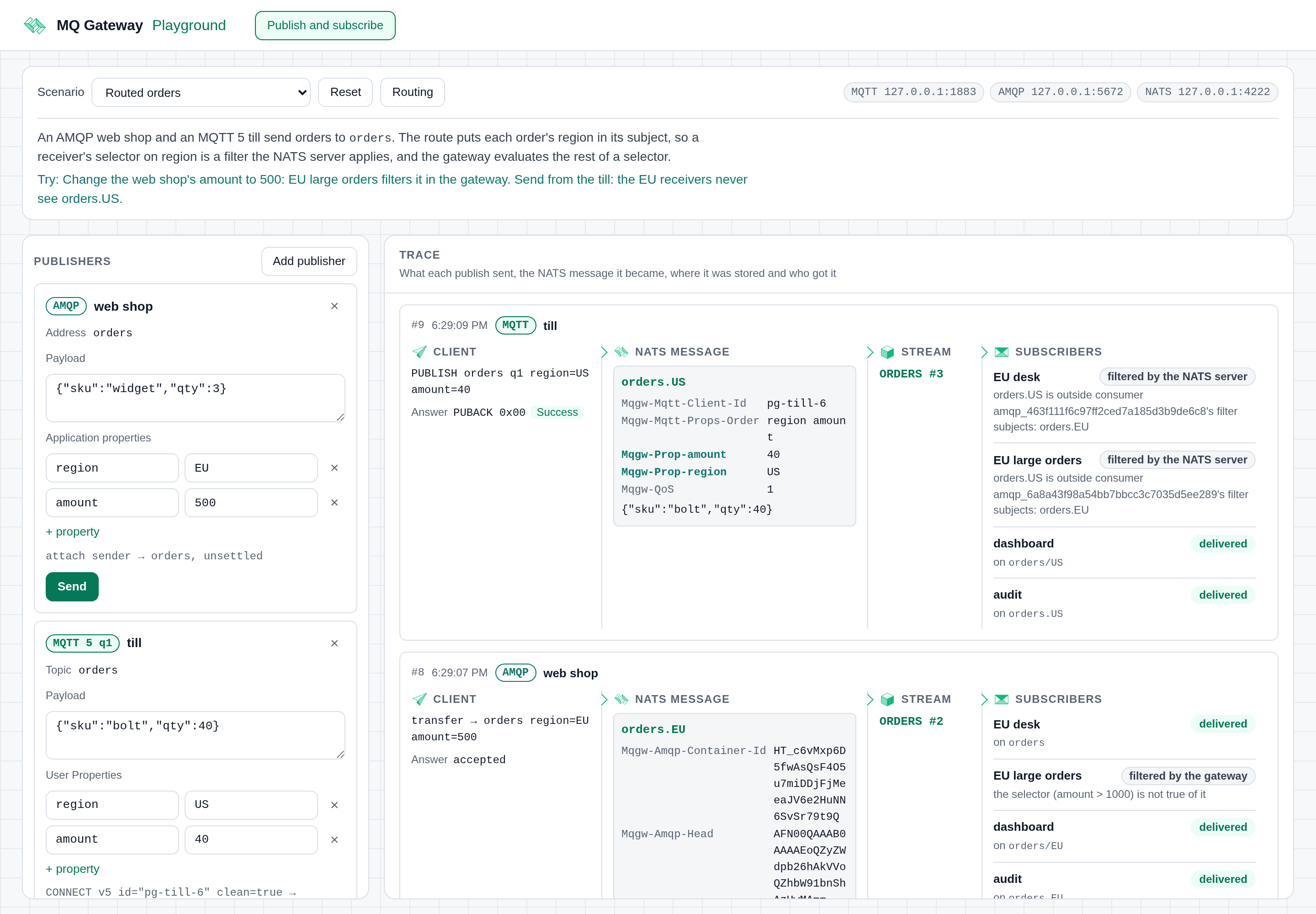
Use Add publisher and Add subscriber to try your own topics, addresses and subjects. Click Routing to see the bindings and routes that the gateway serves.
6. Connect your own clients
The four clients below send and receive orders through the playground. The
playground routes an order sent to orders to the subject
orders.<region>, from the order's region property. The stream ORDERS
stores it.
Run each client in its own terminal, in this order. The receivers must be running before the orders arrive.
Java JMS: An order desk
Qpid JMS speaks AMQP 1.0. The queue orders is the AMQP address orders.
Save this as src/main/java/EuDesk.java:
import jakarta.jms.JMSConsumer;
import jakarta.jms.JMSContext;
import jakarta.jms.Message;
import org.apache.qpid.jms.JmsConnectionFactory;

public class EuDesk {
    public static void main(String[] args) throws Exception {
        var factory = new JmsConnectionFactory("amqp://127.0.0.1:5672");
        try (JMSContext context = factory.createContext()) {
            JMSConsumer consumer = context.createConsumer(
                context.createQueue("orders"), "region = 'EU' AND amount > 2000");
            while (true) {
                Message order = consumer.receive();
                System.out.println(order.getStringProperty("region") + " "
                    + order.getObjectProperty("amount") + " "
                    + new String(order.getBody(byte[].class)));
            }
        }
    }
}
Save this as pom.xml next to src:
<project xmlns="http://maven.apache.org/POM/4.0.0">
  <modelVersion>4.0.0</modelVersion>
  <groupId>example</groupId>
  <artifactId>eu-desk</artifactId>
  <version>1</version>
  <properties>
    <maven.compiler.release>17</maven.compiler.release>
  </properties>
  <dependencies>
    <dependency>
      <groupId>org.apache.qpid</groupId>
      <artifactId>qpid-jms-client</artifactId>
      <version>2.11.0</version>
    </dependency>
  </dependencies>
</project>
mvn -q compile exec:java -Dexec.mainClass=EuDesk
Go NATS: An audit service
A NATS service reads the orders directly from the stream ORDERS. Save
this as main.go in a new directory:
package main

import (
	"context"
	"fmt"
	"log"

	"github.com/nats-io/nats.go"
	"github.com/nats-io/nats.go/jetstream"
)

func main() {
	nc, err := nats.Connect("nats://127.0.0.1:4222")
	if err != nil {
		log.Fatal(err)
	}
	js, _ := jetstream.New(nc)
	cons, err := js.OrderedConsumer(context.Background(), "ORDERS", jetstream.OrderedConsumerConfig{})
	if err != nil {
		log.Fatal(err)
	}
	cons.Consume(func(msg jetstream.Msg) {
		h := msg.Headers()
		fmt.Println(msg.Subject(), h.Get("Mqg-Prop-region"), h.Get("Mqg-Prop-amount"), string(msg.Data()))
	})
	select {}
}
go mod init audit
go get github.com/nats-io/nats.go@v1.55.0
go run .
Python MQTT: A till
The till subscribes to the orders of all regions. Then it publishes a US
order at QoS 1, with its region and amount as User Properties. Save this as
till.py:
import paho.mqtt.client as mqtt
from paho.mqtt.packettypes import PacketTypes
from paho.mqtt.properties import Properties


def on_message(client, userdata, msg):
    print(msg.topic, msg.properties.UserProperty, msg.payload.decode())


client = mqtt.Client(mqtt.CallbackAPIVersion.VERSION2, protocol=mqtt.MQTTv5)
client.on_message = on_message
client.connect("127.0.0.1", 1883)
client.subscribe("orders/+", qos=1)

props = Properties(PacketTypes.PUBLISH)
props.UserProperty = [("region", "US"), ("amount", "90")]
client.publish("orders", '{"sku": "nut", "qty": 100}', qos=1, properties=props)
client.loop_forever()
python3 till.py
The till prints its own order on the topic orders/US. The audit service
prints it on orders.US. The order desk prints nothing, because the order
is not an EU order.
Python AMQP: A web shop
The web shop sends an EU order of 2500. Save this as web_shop.py:
from proton import Message
from proton.utils import BlockingConnection

conn = BlockingConnection("amqp://127.0.0.1:5672")
sender = conn.create_sender("orders")
sender.send(Message(
    body=b'{"sku": "gear", "qty": 2}',
    inferred=True,
    properties={"region": "EU", "amount": 2500},
))
print("order accepted")
conn.close()
python3 web_shop.py
The web shop prints order accepted after the stream stores the order. The
other three clients print the order:
EU 2500 {"sku": "gear", "qty": 2}                                    # JMS order desk
orders.EU EU 2500 {"sku": "gear", "qty": 2}                          # NATS audit
orders/EU [('amount', '2500'), ('region', 'EU')] {"sku": "gear", "qty": 2}   # MQTT till
Stop the clients and the playground with Ctrl-C.
Things to know
- QoS 1 and 2 and unsettled AMQP need a binding. The gateway refuses them on a subject that no stream stores. QoS 0 and presettled AMQP messages travel over core NATS with no acknowledgement. A stream whose subjects match still stores them.
- Properties are headers. An MQTT User Property
regionand an AMQP application propertyregionare both the NATS headerMqg-Prop-region. A NATS service sets that header to reach both. - Send AMQP bodies as bytes. In Proton, send bytes with
inferred=True. In JMS, use aBytesMessage. MQTT and NATS clients get any other body in its AMQP encoding.
Next steps
- Durable messaging: your own streams and buckets, QoS 1 and 2, retained messages and sessions.
- Mapping to NATS: the topic, address and header rules.
- How it works.