Create a schema
This guide will demonstrate how to create a schema using the Control Plane user interface and API.
User interface
The first step is to navigate to the Schema Registry dashboard from inside the appropriate account.
To create a schema:
-
Click on the Create Schema button.
-
Fill out the schema parameters.
noteNote that only the
jsonschemaformat andNo validationpolicy as supported, for now.warningIt is suggested that the
jsonschemadefinition be validated externally prior to added it. You can use a tool like https://www.jsonschemavalidator.net/. Schema Registry does not validate definitions before saving them.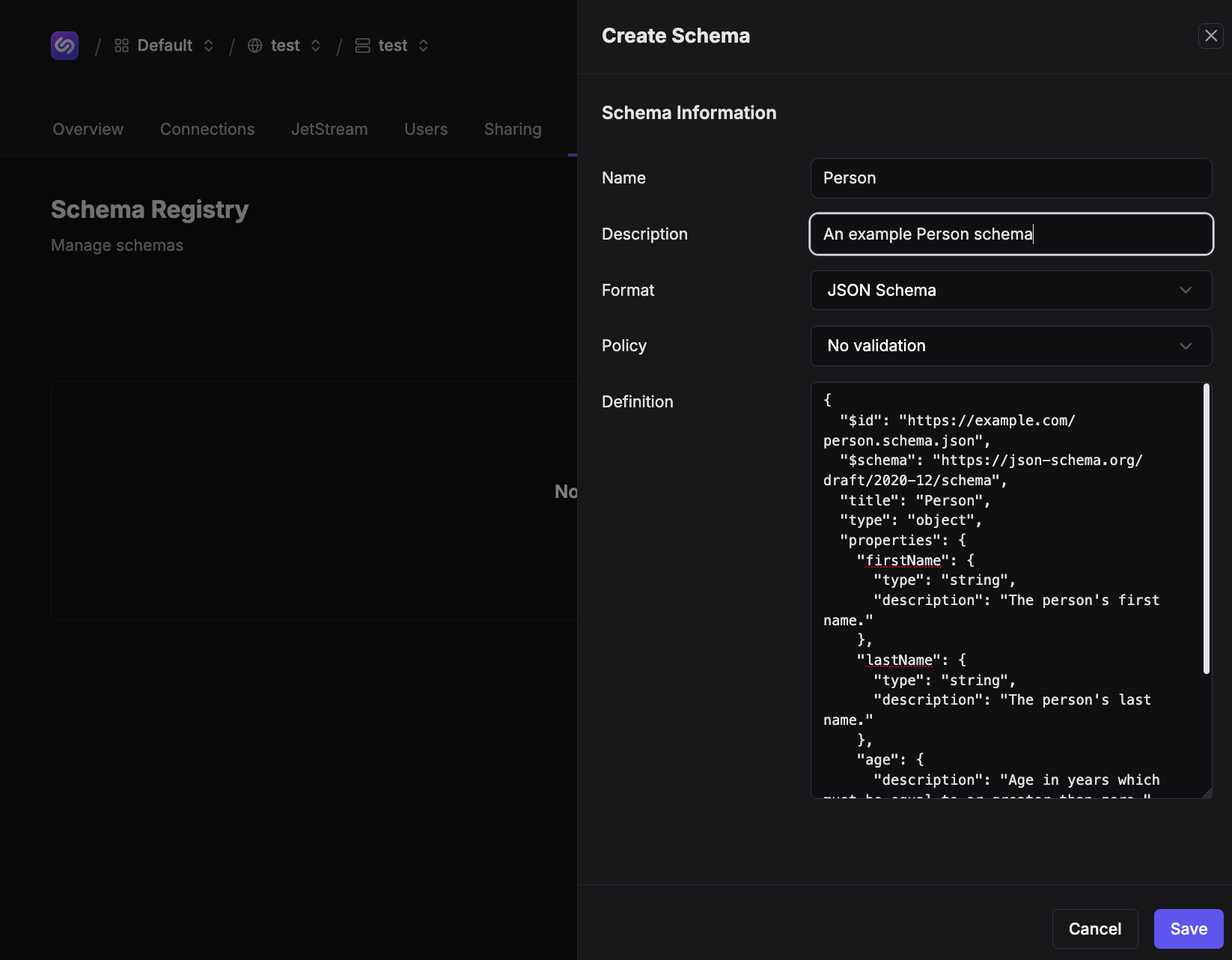
{
  "$id": "https://example.com/person.schema.json",
  "$schema": "https://json-schema.org/draft/2020-12/schema",
  "title": "Person1",
  "type": "object",
  "properties": {
    "firstName": {
      "type": "string",
      "description": "The persons first name."
    },
    "lastName": {
      "type": "string",
      "description": "The persons last name."
    },
    "age": {
      "description": "Age in years which must be equal to or greater than zero.",
      "type": "integer",
      "minimum": 0
    }
  }
}
- Save the schema.
Once the schema is saved the page will redirect to the schema's overview page. This shows the schema in detail.
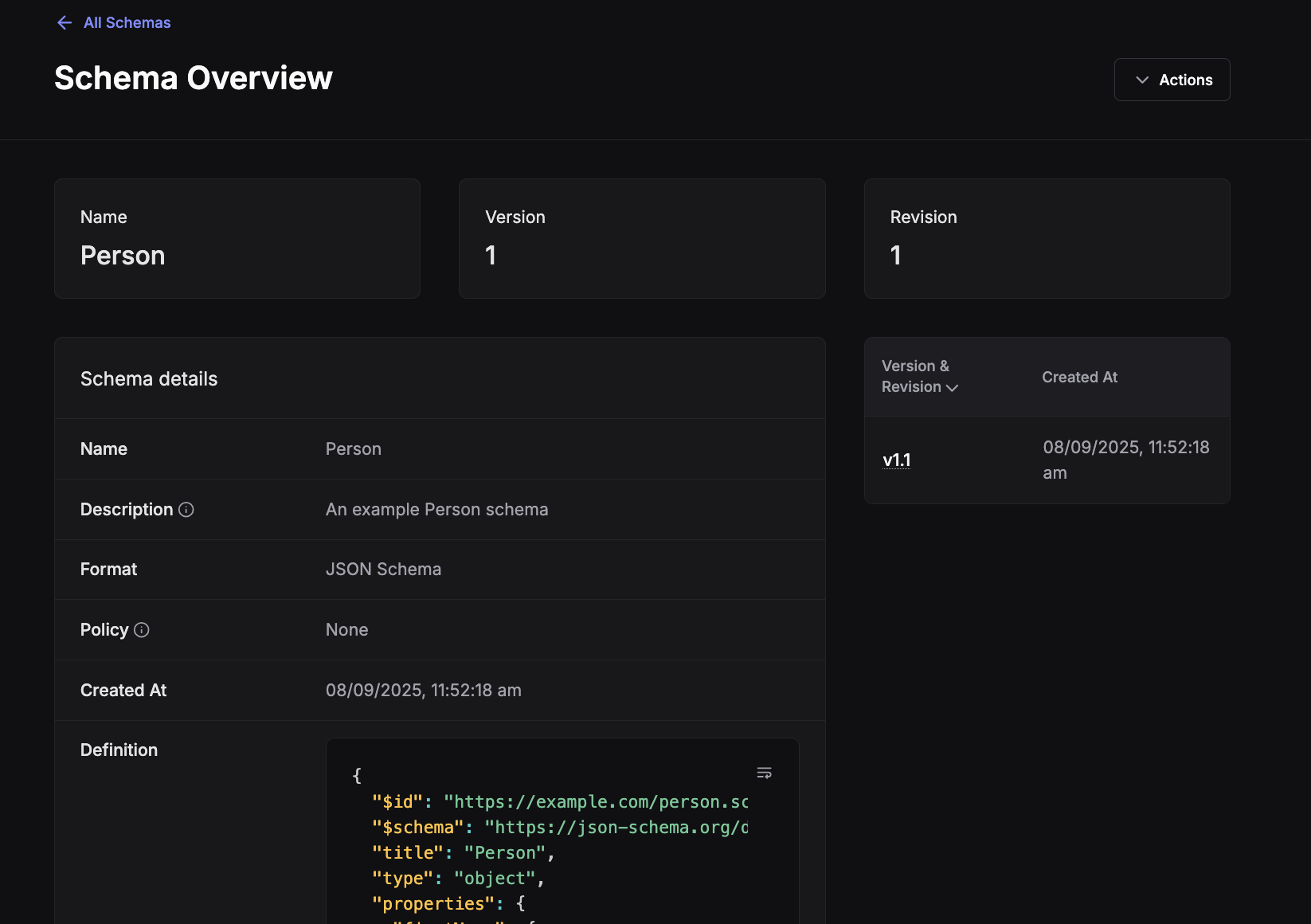
Schemas are created with a version and revision. The initial schema will be version 1, revision 1.
Next, we will show how to update a schema.
NATS
Request subject: $SR.v1.ADD.<schema-name>
Payload: {name:"<schema-name>",format:"jsonschema","definition":<schema-definition>}
export JSONSCHEMA='{"$id":"https://example.com/person.schema.json","$schema":"https://json-schema.org/draft/2020-12/schema","title":"Person1","type":"object","properties":{"firstName":{"type":"string","description":"The persons first name."},"lastName":{"type":"string","description":"The persons last name."},"age":{"description":"Age in years which must be equal to or greater than zero.","type":"integer","minimum":0}},"format":"jsonschema","compat_policy":"none","description":"Simple Sample","metadata":null}'

nats req '$SR.v1.ADD.Person' "$(jq -nc --arg jsonschema "$JSONSCHEMA" '{name:"Person",format:"jsonschema","definition":$jsonschema}')"
API
Access the Schema Registry API's requires an API token.
curl https://${CONTORL_PLANE_URL}/api/schema-registry/alpha/${ACCOUNT_ID}/schemas \
  --request POST \
  --header 'authorization: Bearer ${TOKEN}' \
  --header 'content-type: application/json' \
  --data-raw '{
    "name": "Person",
    "description": "My Person Description",
    "format": "jsonschema",
    "definition": "{\"$id\": \"https://example.com/person.schema.json\", \"$schema\": \"https://json-schema.org/draft/2020-12/schema\", \"title\": \"Person1\", \"type\": \"object\", \"properties\": {\"firstName\": {\"type\": \"string\", \"description\": \"The persons first name.\"}, \"lastName\": {\"type\": \"string\", \"description\": \"The persons last name.\"}, \"age\": {\"description\": \"Age in years which must be equal to or greater than zero.\", \"type\": \"integer\", \"minimum\": 0}}}"
  }'
Will return a 201 Created and response object:
{
  "revision": 1,
  "version": 1
}
Refer to the API documentation for more information. For Control Plane this will be https://${CONTROL_PLANE_URL}/api-docs